Fantastis48 Commers


Saturday, May 19, 2012

Android Skin Pack 1.0 x86 for Windows 7


Jika sebelumnya saya sudah pernah memposting tentang Android Ice Cream Sanwich , kali ini saya kembali memposting tentang skin pack windows 7-32bit yaitu Android Skin Pack 1.0 x86. Skin Android ini tidak sama dengan Android Ice Cream Sanwich sebelumnya yang pernah saya post. Tetapi skin pack ini sama dengan skin pack yang lain yaitu untuk membuat Windows atau PC anda terlihat lebih keren. jika anda tertrik untuk mencoba Android Skin Pack1.0 x86 ini anda dapat mendownloadnya di sini.

Android Skin Pack 1.0 x86 for Windows 7.zip

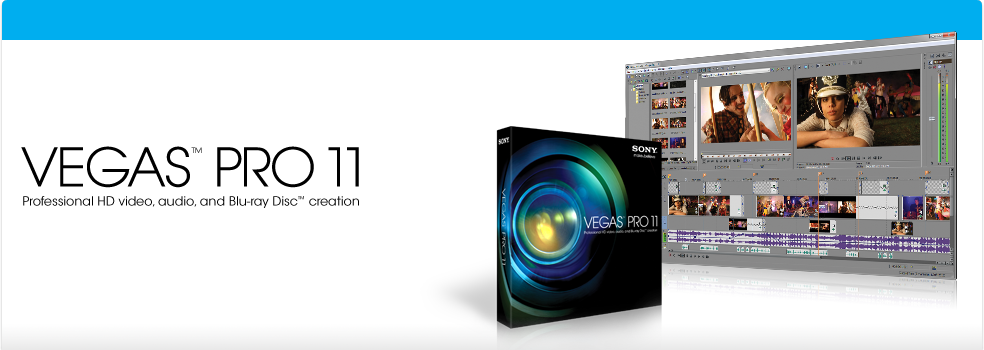
Sony Vegas 11.0.520 Pro


Sony Vegas 11.0.520 Pro adalah software yang mempunyai fungsi sebagai software video editing. Namun software ini tidak hanya bisa mengedit Video tetapi juga mampu mengedit Audio atau lagu. Software ini mempunyai kurang lebih 190 efek dan transisi untuk mengedit video dan yang pasti sangat menakjubkan. salah satu kegunaannya adalah dapat menggabungkan file video-video yang dipecah menjadi satu file video dan juga dapat menggabungkan file audio juga. software ini dapat berjalan pada Windows XP 32bit,Windows Vista 32bit dan 64bit,Windows 7 32bit dan 64bit.

Changes in version 11 :
Implemented numerous fixes in the video FX timeline editor.
Implemented numerous fixes in the OFX plug-in API.
Enabled 1080-50p/60p for Sony AVC.
Enabled B-frame rendering for nonbaseline profiles for Sony AVC.
Improved the MPEG-2 Reader.
Fixed a crash when canceling two-pass MPEG-2  Renders.


  • Fixed an issues that could cause FX automation envelopes to changes with parameter they controlled when switching plug-ins using the insert FX region of the missing console.
  • Fixed an issues that could cause the wrong plug-in to be added when adding an effect from the insert FX region of the missing console.
  • Fixed an undo buffer error that could occur after bypassing FX on an input bus.
  • Fixed a crash when rendering a file when MIDI port are enabled.
  • Fixed a reversal of the vertical offset direction in the stereoscopic 3D adjust plug-in if rotation an keystone adjustments were both zero.
  • Fixed missing render templates in the Export Video to XDCAM disk dialog.
  • Fixed a crash when using show video monitor in the trimmer when stereoscopic 3D is active on the External Monitor from the preview window.
  • Fixed issues with Build Dynamic RAM Preview not stopping when requested if pan / crop window is open,or stopping early if video FX window is open

Friday, May 18, 2012

ALShow v2.01


Download ALShow Media Player v2.01

Features :

Built-in Codecs & Online Codec Center :
ALShow includes the basic codecs to play most of the movies. For those rare kinds of codecs that are not popularly used, ALShow will download the codec from ALShow Codec Center then install it for you. With ALShow, you do not have to wander around the internet to find the proper codec for your video. ALShow will do everything for you.

Hide & Mute with ESC key :
When you are secretly watching a new blockbuster movie in your office, and when your boss is approaching you, what will you do? Usually you will try to click the small ‘X’ button or press ALT + F4 with an awkward finger position. Your boss is smart enough to notice what your action means. With ALShow, just press the ESC key. Pressing ESC will pause and mute the movie, and will disappear from your taskbar. Now, here is a tip. Open up a document you are working on, place ALShow on top of it, play the movie, place your left hand’s ring finger on the ESC key and right hand on your mouse. When your boss comes near you, quietly press the ESC key and wheel down the mouse wheel pretending you were reviewing the document :).

Video/Audio/Screen Capturing :
More than just a movie player, ALShow has the function to capture audio, video or screen shots to your hard drive.


Bookmark Your Movie :
ALShow provides a Bookmark function that let you play from your preferred part of the movie. If you see an awesome scene in the movie and want to show your friends later, bookmark it. You can start the movie from the part you have bookmarked by few clicks instead of skimming the entire movie.

Loop to Repeat Video Segments :
Tired of rewinding? Loop it! ALShow lets you quickly and easily loop video segments with a start marker and an end marker so that you can view part of a scene again and again as much as you like.

Supported Formats :
3G2, 3GP, 3GP2, 3GPP, ASF, ASK, ASX, AVI, BMK, DAT, DIVX, FLV, IFO, K3G, M1V, M2T, M2TS, M2V, M4V, MKA, MKV, MOV, MP4, MPA, MPE, MPEG, MPG, MTS, OGM, RM, RMVB, SKM, SMI, SMIL, SRT, SUB, SWF, TP, TS, VOB, WM, WMP, WMV, WMX, WVX


License Information

Portions of ALShow Video and Audio Filter use and follows the GNU LGPL (Lesser General Public License). Details and source code may be downloaded here:

Source download : ffmpeg 

Wednesday, May 16, 2012

GOM (Gretech Online Movie) Player

GOM Player adalah perangkat lunak (software) yang dapat melihat atau mendengarkan berkas (file) video dan suara yang dapa diberikan efek khusus. GOM Player memiliki fitur yang dapat memberikan efek equalizer pada suara yang akan dihasilkan, efek equalizer pada suara yang disediakan perangkat lunak ini antara lain Rock, Reggae, Party, Classical, Club, Dance, Full, Bass, dan sebagainya.

GOM Player menyediakan fitur skin yang dapat diubah dalam bentuk basic atau default. Fitur yang tidak kalah canggihnya yaitu adanya fasilitas Pan & Scan, Screen Capture, Advance Capture. GOM Player dapat memutar banyak sekali jenis berkas termasuk AVI, MPEG, DivX, DAT, VOB, MP4, 3GP, RMVB, FLV, dan MOV. Program ini juga dapat melakukan streaming dan dilengkapi berbagai fitur yang menarik. Semua format berkas video dapat dijalankan lewat GOM Player ini. Untuk menggunakan aplikasi ini, lakukan penginstalan DirectX yang baru dan Windows Media Player.

GOM Player dapat berjalan di sistem operasi Windows ME, Windows 2000, Windows XP, atau Windows Vista,Windows 7.


Download GOM Player


GOM Player (Gretech Online Movie Player) is a 32/64-bit media player forMicrosoft Windows, distributed by the Gretech Corporation of South Korea.

It is the primary client player for South Korean GOM-TV, and is more popular in South Korea than any other media player. Key strengths inherited from libavcodecinclude wide ranging ability to play media files, including .flv - without needing to obtain an external codec, and the ability to play some broken media files. Both of those features are present in other projects using libavcodec like VLC andMPlayer, but are absent from some other media software, including Windows Media Player.

The word gom (곰) means "bear" in Korean, and as such GOM Player uses a bear's paw as its symbol.


Supported files and devices :
The latest version of GOM Player will playback the following types of media file.
Incomplete or damaged AVI files (skipping the damaged frames)
Broken AVI files (rebuilding the file's Index in real-time)
ASF/OGG/MP3/AVI files on an HTTP Streaming connection
Using DirectShow it will play these file formats: AVI, WMV, Matroska, QuickTime, MP4, 3GP, Google Video, Flash Video,VOB, Ogg, OGM, RMVB, MPEG-1, MPEG-2
RealMedia files (requires Real Alternative installed)
QuickTime files (requires QuickTime Alternative installed)

The latest version of GOM Player will playback the following types of disc -
Audio CD (requires Windows 2000 or Windows XP)
DVD (requires MPEG-2 codec installed)
Video CDs/SVCDs/XCD s

  • Microsoft Windows 7 (32 / 64bit), Vista (32 / 64bit), XP (32 / 64bit), 2000, ME, 98SE
  • Intel Pentium III or AMD Athlon or equivalent
  • Over 16MB free RAM
  • Over 25MB free HDD space.


Supported video/audio formats :
The latest version of GOM Player natively supports the following video and audio formats, without any external codecs:
Video formats
MPEG-1, MPEG-4 Part 2, MS MPEG4 V1/2/3, MJPEG, H.263(+), H.264 (MPEG-4 AVC), FLV1, MSVIDC


Audio formats :
WAV, MP3, Vorbis, AMR, QCELP, EVRC

GOM Player also supports peer-to-peer video streaming through an official add-on called GOMTV Streamer.

Subtitles :
The latest version of GOM Player supports the following subtitle formats -
  • Unicode Text Subtitles
  • SAMI (smi)
  • SubRipText (srt), MicroDVD (sub), SMIL/RealText
  • SubStation Alpha (ssa), Advanced SubStation Alpha (ass)
  • VOBsub (sub/idx)
  • Embedded subtitles of ASF, MKV, OGM


Codecs Finder :
Another significant feature of GOM Player is that where it can't play the audio or video of a media file natively, it will try to find an appropriate external codec which will play that file format, using the format's GUID, a unique identifier for the required codec. On finding a match, it will direct the user to a webpage where the appropriate codec can be downloaded and installed.

Nero Kwik Media 11.0.17100

Nero BurnLite 10 Free Full Version --> Nero Kwik Media 11.0.17100

Nero sebagai produsen software CD/DVD burner termuka menyediakan versi gratis dari Nero 10 yaitu Nero BurnLite free. Setelah sebelumnya Nero mengeluarkan Nero BurnLite 9, sekarang Anda bisa melakukan download Nero BurnLite 10 secara gratis. Nero BurnLite terbaru ini dinyatakan sangat kompatibel dengan Windows 7. Dengan Nero BurnLite 10 ini Anda bisa membakar CD dan DVD secara mudah dan simpel. Disamping itu, Anda juga diberikan kemudahan untuk melakukan upgrade ke versi berbayar yaitu Nero Burning ROM 10 dan Nero Multimedia Suite 10.

Nero BurnLite 10 Free Full Version
Kebutuhan minimun system untuk Nero BurnLite 10:
  1. Operating sistem: Windows® XP SP3 (32-bit), Windows Vista® SP1 (32 and 64-bit), Windows® 7 Home Premium, Professional, Enterprise or Ultimate (32 and 64-bit)
  2. Processor: 2 GHz, AMD atau Intel®
  3. RAM: 512 MB atau 1 GB RAM untuk Windows Vista® or Windows® 7
  4. Hard drive: 300 MB ruang hard drive untuk instalasi secara penuh (termasuk temporary file)

Nero 10 versi gratis ini mendukung beberapa media untuk dibakar yaitu CD-R, CD-RW, DVD±R, DVD±RW, DVD-RAM, dan DVD±R DL. Selain itu, Nero BurnLite 10 ini jug amendukung beberapa format disk yaitu Data CD (ISO, UDF, ISO/UDF) dan Data DVD (ISO, UDF, ISO/UDF).

Update (8 Juli 2011)
Sekarang ini Nero BurnLite telah diganti namanya menjadi Nero Kwik Burn. Software ini tetap gratis (free). Ada beberapa perubahan yang tejadi setelah pergantian nama ini. Detail lengkapnya silahkan Anda baca di: http://www.nero.com/eng/downloads-nbl-free.php. Selain itu, file installernya juga menjadi lebih besar yaitu 174,13 MB serta ruang harddisk yang dibuthkan menjadi 1GB.


Nero 10 Platinum HD Logo

Nero BurnLite is now Nero Kwik Burn
!
Still the best for burning, still FREE, and now it's a convenient app within Nero Kwik Media.

Nero BurnLite was great. But now it’s even faster and better than ever as the new and improved Nero Kwik Burn app, which is part of Nero Kwik Media. Get the same great features of Nero BurnLite plus more from your burning, ripping and copying activities with the all-new and free Nero Kwik Burn.


  • Burn photos, music, videos and data onto CD, DVD and now Blu-ray Disc – NEW!
  • Drag and drop files to copy iTunes playlists - NEW!
  • Copy unprotected CDs, DVDs and Blu-ray Discs
  • Rip MP3 files for sharing and storing
Download Nero Kwik Media Free 11.0.17100

HWiNFO/32/64 Tools

HWiNFO/32/64 Tools
Professional System Information and Diagnostics


 HWiNFO adalah software yang dapat mendeteksi hardware di PC atau Komputer anda. dan melihat Informasi Ratting di tingkat manakah letak Hardware anda. selain mendeteksi hardware software ini juga mampu mendiaknosis Kecepatan pada harware tertentu  misalkan Memory RAM,Prosesor,Kartu Gravis atau VGA Card,Harddisk Intenal,dll. dan software ini juga dapat di update internet tentang perkembangan Hardware-Hareware yang ada di dunia.


 HWiNFO 32bit Setup :
Download HWinfo Software Setup
Download  HWinfo.zip
Download HWinfo Beta.zip
HwiNFO 64bit Setup :
Download HWiNFO v3.95-1600
Download HWiNFO v3.95-1600.zip
Download HWiNFO v3.95-1620 Beta.zip


HWiNFO™, HWiNFO32™ and HWiNFO64™ are professional hardware information and diagnostic tools supporting latest components, industry technologies and standards. These tools are designed to collect and present the maximum amount of information possible about computer's hardware which makes them suitable for users searching for driver updates, computer manufacturers, system integrators and technical experts as well. Retrieved information is presented in a logical and easily understandable form and can be exported into various types of reports.

HWiNFO64™ - A powerful system information tool for Windows 64-bit
  Comprehensive hardware information
  System health monitoring (Thermal, Voltage, Fan, Power)
  Table, Logfile, Graph, Tray, Gadget, LG LCD reporting
  Full 64-bit Application
  Text, CSV, XML, HTML, MHTML report formats
  Periodical updates
  Windows XP/Vista/Server 2003/2008/Windows 7/8
  Platform: 64-bit (x64 / AMD64)
  Available as HWiNFO64 SDK (Custom Client) !


HWiNFO32™ - A powerful system information tool for Windows


  Comprehensive hardware information
System health monitoring (Thermal, Voltage, Fan, Power)
Table, Logfile, Graph, Tray, Gadget, LG LCD reporting
Basic benchmarks
Text, CSV, XML, HTML, MHTML report formats
Periodical updates
Windows 9x/2000/XP/Vista/Server 2003/2008/Windows 7/8
Platform: 32-bit (IA-32), 64-bit (x64, IA-64)
Available as HWiNFO32 SDK (Custom Client) !


HWiNFO™ - A powerful system information tool for DOS
  Comprehensive hardware information
  System health monitoring
  Full and short report format
  Regular updates
  DOS only (i386+)
  Freeware


Google Chrome And Chromium


Google Chrome adalah sebuah peramban web sumber terbuka yang dikembangkan oleh Google dengan menggunakan mesin rendering WebKit. Proyek sumber terbukanya sendiri dinamakan Chromium.

Versi beta untuk Microsoft Windows diluncurkan pada 2 September 2008 dalam 43 bahasa. Versi Mac OS X danLinux sudah dirilis.


Download Google Chrome
Google Chrome 15


Google Chrome is a freeware web browser developed by Google that uses theWebKit layout engine. It was first released as a beta version for Microsoft Windows on September 2, 2008, and the public stable release was on December 11, 2008. As of January 2012, Google Chrome has approximately 25–28% worldwide usage share of web browsers, making it the second or the third most widely used browser, according to different estimates.

In September 2008, Google released a large portion of Chrome's source code as an open source project called Chromium. This move enabled third-party developers to study the underlying source code and to help port the browser to the Mac OS X and Linux operating systems. Google also expressed hope that other browsers would adopt the V8 JavaScript engine to improve web application performance. The Google-authored portion of Chromium is released under the permissive BSD license, Other portions of the source code are subject to a variety of open source licenses. Chromium implements a similar feature set as Chrome, but lacks built-in automatic updates, built-in PDF reader and Google branding, as well as built-in Google tracking and has a blue-colored logo instead of the multicolored Google logo.

ada pula software project dari google chrome yang lain yaitu :
Chromium Browser


Chromium browser adalah software proyek dari Google Chrome yang mengambil Ekstensi dari Google Chrome dan di kembangkan lagi. Dan telah tercipta Web browser baru yaitu Chromium. Chromium ini bisa berjalan pada System Operasi dari LINUX,Mac,dan juga Windows. Namun masih terjadi masala pada penggunaan Chromium bahwa masih sering terjadi Crash pada Software ini yang membuat pemakainya bingung,baik di LINUX,Mac,maupun Windows sekalipun.

Bagi Anda pengguna sistem operasi windows (XP, Vista, maupun 7) yang penasaran dan tertarik mencoba web browser Chromium ini. silakan mendownload file installer pada link di bawah ini. File-nya sendiri dalam format ZIP (versi portable).


Chromium is the open source web browser project from which Google Chromedraws its source code.

The Chromium Project takes its name from the element chromium, the metal from which chrome is made. Google's intention, as expressed in the developer documentation, was that Chromium would be the name of the open source project and that the final product name would be Chrome. However, other developers have taken the Chromium code and released versions under the Chromium name.

One of the major aims of the project is for Chrome to be a tabbed window manager, or shell for the web, as opposed to it being a traditional browser application. The application is designed specifically to have a minimalist user interface. The developers state that it "should feel lightweight (cognitively and physically) and fast".


Differences Chromium and Google Chrome
Chromium is the name given to the open source project and the browser source code released and maintained by the Chromium Project. It is possible to download the source code and build it manually on many platforms. Google takes this source code and adds:
  • integrated Flash Player
  • built-in PDF viewer
  • the Google name and more colorful logo
  • auto-update system called GoogleUpdate
  • an opt-in option for users to send Google their usage statistics and crash reports
  • RLZ tracking when Chrome is downloaded as part of marketing promotions and distribution partnerships. This transmits information in encoded form to Google, e.g., when and from where Chrome has been downloaded. In June 2010, Google confirmed that the RLZ tracking token is not present in versions of Chrome downloaded from the Google website directly or in any version of Chromium. The RLZ source code was also made open source at the same time so that developers can confirm what it is and how it works.
By default, Chromium only supports Vorbis, Theora and WebM codecs for the HTML5 audio and video tags; whereas Google Chrome supports these, plus AAC and MP3. On 11 January 2011, the Chrome Product manager, Mike Jazayeri, announced that Chrome will no longer support the H.264 video format for its HTML5 player, equally as Chromium does not. As of April 2012, however, Chrome still supports H.264. Certain Linux distributions may add support for other codecs to their customized versions of Chromium.


Tuesday, May 15, 2012

Opera Web Browser


Opera started out in 1994 as a research project within Telenor, Norway’s leading telecom. Within a year, Opera Software ASA was launched as an independent development company. Today, Opera is headquartered in Norway, with over 700 employees in offices around the world.

Since the beginning, Opera’s founders and employees have shared the belief that access to the Web is a universal right. This has guided the company’s product development, and the Opera web browsers are adapted to a wide range of platforms, operating systems and embedded Internet products — including Mac, PC and Linux computers, tablets, mobile phones and PDAs, as well as various game consoles and other devices.

Opera Software has always strived to develop the fastest and technologically most advanced browsers. As a result, the Opera browser is the choice of some of the world’s most demanding and knowledgeable users. At the same time, when the powerful compression technology in the full browser is applied to the Opera Mini browser, the Web is accessible on even the simplest handsets, with small screens and limited memory. This has made the Opera Mini browser the world’s most popular mobile browser.

We are passionate about breaking down barriers, so everyone can share in the power of the Internet. We believe in the power of a single idea. Participation changes everything.Opera Software ASA is listed on the Oslo Stock Exchange under the ticker symbol OPERA.


Opera's fastest mobile browser that can save you money on data. Totally free.

Try the world's fastest Android browser!

- FAST: Opera’s speed and efficient controls put it ahead of all other browsers.
- EASY: Surf the Web on your mobile as easily as on a desktop computer.
- SAVE MONEY: Reduce data costs by up to 90% with our unique compression technology.

And it's completely free to install and use.

Other great features:
– Speed Dial shows you all of your favorite websites at a glance. Pull them up with one tap!
– Tabs let you keep multiple pages open and switch between them.
– Reading online is better with page sizes, address bars and toolbars that adjust automatically.

Download Opera Mini for yourself today!


Also check out Opera Mobile, the premium experience when on Wi-Fi or wireless broadband.

Discover more at http://opera.com/mobile/
Keep in touch with Opera:
Twitter - http://twitter.com/opera/
Facebook - http://www.facebook.com/Operamini/


Send Messages with Cbox